By clicking “Accept All Cookies”, you agree to the storing of cookies on your device to enhance site navigation, analyze site usage, and assist in our marketing efforts. View our Privacy Policy for more information.

We cover the basics - and go way beyond

No credit card needed
14-day free trial
Monthly
Annual
Rules Studio - Only in EZShift

Unlimited Scheduling Rules
Define rule to enforce shift limits, rest periods, equitable workload distribution, shift rotations, and ensure labor law compliance
Policy Studio - Only in EZShift

Unlimited Availability Policies
Set custom criteria and rules for employee availability requests
Everything from EZ Pro PLUS:

Client-installed software (optional)
Custom reports
Web APIs
Single sign on (SSO)
Content portal
Actions' log
Extended views
Enterprise support
Time & Attendance
Dynamic Offset Management
Payroll Integration
Wage Agreements
Most Popular
Rules Studio - Only in EZShift
Unlimited Scheduling Rules
Define rule to enforce shift limits, rest periods, equitable workload distribution, shift rotations, and ensure labor law compliance
Policy Studio - Only in EZShift
Unlimited Availability Policies
Set custom criteria and rules for employee availability requests
Everything from EZ Start PLUS:

Biweekly / Monthly Scheduling
Unlimited templates
Multi location scheduling
Cross-location employee assignment
Open shifts registration
Holidays & Special Dates
Extended reports
Role hierarchy & skill levels
Extended security managment
Pro support
Time & Attendance
Advanced Time Tracking
Compliance
Rules Studio - Only in EZShift
Up to 2 Scheduling Rules
Define rule to enforce shift limits, rest periods, equitable workload distribution, shift rotations, and ensure labor law compliance
Policy Studio - Only in EZShift
Up to 2 Availability Policies
Set custom criteria and rules for employee availability requests

Automatic scheduling
Full schedule checkup
Role violation alerts
Smart assignment recommendation
Shift swaps module
Holidays & time off module
In-app team communication
Weekly schedule & templates
Roles, skills & teams
Email support
Time & Attendance
Clock In Clock Out
Performance vs. Plan Reports

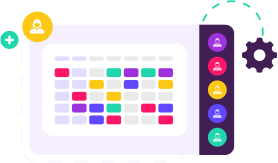

Only in EZShift
Build and apply unlimited multi-step rules to automate workflows, ensure compliance, and rule your schedule

Set shift limits by role, tag, or team
Prevent overworking with built-in rest rules
Balance workloads across the team
Rotate shifts automatically
Stay compliant with labor regulations
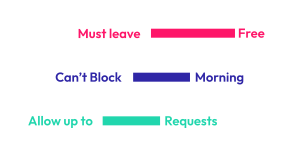
Only in EZShift
Set smart availability rules to manage requests with full transparency and control
Automate availability based on your company policies
Apply tailored rules for different employee groups
Limit unavailable days
Restrict number of requests per period
Keep scheduling fair with clear, shared policies
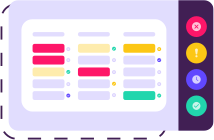

Easily View & Manage Large Schedules
Drag & Drop Interface
Automatic Shift Scheduling
Smart Schedule Recommendations
Ad Hoc Changes
Scheduling Optimization
Compliance Checks
& Warnings
Advanced Shift Settings
Multiple Templates
Schedule Across Departments
Filters & Counters
Backups & Manager Actions Log
Weekly, Biweekly or Monthly Schedules
Employees Availability
Special Requests
Shift Swap
View Work Schedule
Notifications & Reminders
Internal Messaging
Register for Empty Shifts
Information Portal
Sync with External Calendars
Track & Update Employee Availability
Time‑off Requests
& Approvals
Shift Swap Management
Register New Employees
View & Edit Work Schedule
Communication Between Employees & Managers
Multiple View Options
Information Portal
Compliance with Labor Laws & Local Regulations
Rest Periods Between Shifts per Legal Requirements
Alignment with Internal Policies
Equitable Shift Distribution Based on Defined Criteria
Enforcement of Legal Work Hour Limits
Automated Shift Rotation
Custom Employee Caps per Shift
Permission Levels
for Managers
Setting Availability Request Policies
Custom Roles, Job Types & Skills
Double Shift Configuration
API Integration with Payroll, SAP, BI etc.
Data Security
Multi-Stage Approvals for Managers
Reports & Exports


Working with EZShift has improved our communication and transparency with employees. The option to schedule shifts on weekends helps ensure fairness and flexibility for everyone. With EZShift, we maintain a well-balanced schedule — and that keeps our employees happy.
Itamar - Scheduling Manager, Mobileye

The system provides us with effective schedule management, transparency, and peace of mind. It saves valuable time by automatically applying scheduling rules and enabling clear, direct communication with employees. Our entire scheduling process has become significantly more efficient.
Moshe - Call Center Manager - Shahal

Thanks to EZShift, interfacing with our payroll software is much more efficient and convenient. Our communication with employees across different sites has never been better, and the EZShift team consistently provides excellent service.
Katya - Operations Manager, Team3

EZShift provides us with a simple and efficient tool to manage all departments across our organization. With their smooth interface, we can easily transfer work schedules to additional operating systems, and they always make great effort to meet our specific requirements.
Ira - IT Manager, Bazan Group

As a large company with hundreds of employees across multiple locations, precise scheduling is essential. We must assign shifts accurately and ensure full compliance with labor laws — especially when employing minors. EZShift allows us to manage shift scheduling, coordinate employee transportation, and implement work schedules efficiently and consistently.
Hezi - VP Finance, Cinema City

It's important for us to work efficiently and deliver the highest quality therapeutic care. EZShift undoubtedly helps us manage our scheduling more effectively. Their customer service team is always kind, responsive, and dedicated to meeting our needs.
Avishay - CEO, Guy Group

We manage several service centers and employ a large number of staff. With the help of EZShift and its smart scheduling rules, we’re able to define employee schedules in accordance with work agreements and enable flexibility in scheduling - all while meeting organizational requirements. The app makes continuous communication with employees easy, and the customer service is simply excellent!
Shai - Call Center Operations Manager, Mizrahi Tefahot Bank

EZShift allows us to create continuous communication with employees, while still meeting the needs of the restaurant and managing employee availability. It helps us create a professional, efficient, and stable experience for our employees - and the results are reflected in improved employee attendance and the overall atmosphere of the restaurant.
Gil - Owner, Hudson restaurant

Employee scheduling in a hospital is a complex task — it varies between departments, requires on-call staff, and often includes special shifts. On top of that, schedules must comply with both internal policies and external regulations. EZShift helped us streamline shift planning and provided a clear, organization-wide view of staffing across all departments. Their support team is always available, professional, and courteous.
Eran - IT Manager, Soroka hospital

Scheduling staff and managing attendance at the airport is a complex and multifaceted challenge. Many factors must be fully synchronized — including flight schedules, staff availability, multiple tasks during shifts, employee certifications, customer demand, and more. With EZShift, we manage employee scheduling, tasks, and attendance in a transparent and accurate way, while reducing manpower costs. We've received professional, courteous, and prompt service from the EZShift team for years.
Iris - VP HR, QAS

No. You can cancel your subscription at any time. Monthly plans stay active until the billing cycle ends. Annual plans don’t include refunds.
Once you sign up, you’ll get 14 days of full access to all features in the EZ Pro — no credit card required. If you choose a paid plan, your subscription will only begin after the trial ends.
Yes — the minimum plan includes scheduling for 20 employees. You can easily scale up in increments of 10 employees.
Yes. When an administrator permanently deletes an employee from the archive, all associated personal data is completely removed from the system in full compliance with GDPR requirements.
We currently accept payments via credit cards.
Absolutely. If you upgrade your plan or add employees, you'll be billed a prorated amount at your next payment date. If you reduce employees or downgrade, changes will apply from the next billing period.
Billing occurs at the beginning of each month. Upon signup, you’ll be charged a prorated amount covering the remainder of that month.
All admins are included in the total user count.
